CardFormSubmitComponent
This component allows you to create a card component with a form to submit.
It depends on ValidationObserver from Vee Validate and it can receive any type of column-component created in the definition binded.
It depends on CardComponent component to.
Example
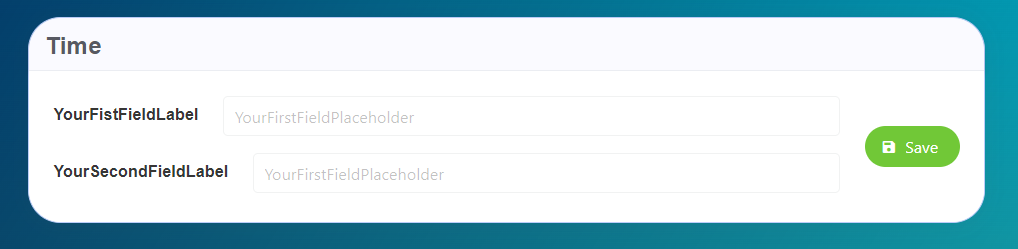
<card-form-submit-component
    v-for="(card, key) in form"
    :key="key"
    :card-title="card.title"
    :submit-url="card.submitUrl"
    :form="card.form"
/>

import TextComponent from 'premium-tesh-ui-lib'
export default {
  name: 'App',
  data() {
    return {
      form: {
        FirstCard: {
          title: 'Time',
          submitUrl: '/url',
          form: {
            FirstField: {
              type: TextComponent,
              value: '',
              default: ''
              'field-wrapper': { class: 'is-12' },
              'field-input': {
                label: 'YourFistFieldLabel',
                placeholder: 'YourFirstFieldPlaceholder'
              }
            },
            SecondField: {
              type: TextComponent,
              value: '',
              default: '',
              'field-wrapper': { class: 'is-12' },
              'field-input': {
                label: 'YourSecondFieldLabel',
                placeholder: 'YourFirstFieldPlaceholder'
              }
            }
          }
        }
      }
    }
  }
}
Props
| Name | Description | Type | Required | Default |
|---|---|---|---|---|
| form | The form to show on the component | Object | false | - |
| cardTitle | The card title | String | false | "" |
| titleClass | The title class | String | false | "is-size-4" |
| cardSubtitle | The card subtitle | String | false | null |
| cardSubtitleClass | The subtitle class | String | false | "is-size-5" |
| submitUrl | The submit url | String | false | "" |
| submitDisabled | Disable the submit option. you will not able to submit | Boolean | false | false |
| locale | Locale string {en, es ...} for display language on component | String | false | "en" |